

In this step-by-step tutorial, you will learn how an AI chatbot for Telegram works under the hood, how Retrieval-Augmented Generation (RAG) prevents incorrect answers, and how to launch your own custom bot in Botconsole in under 15 minutes.
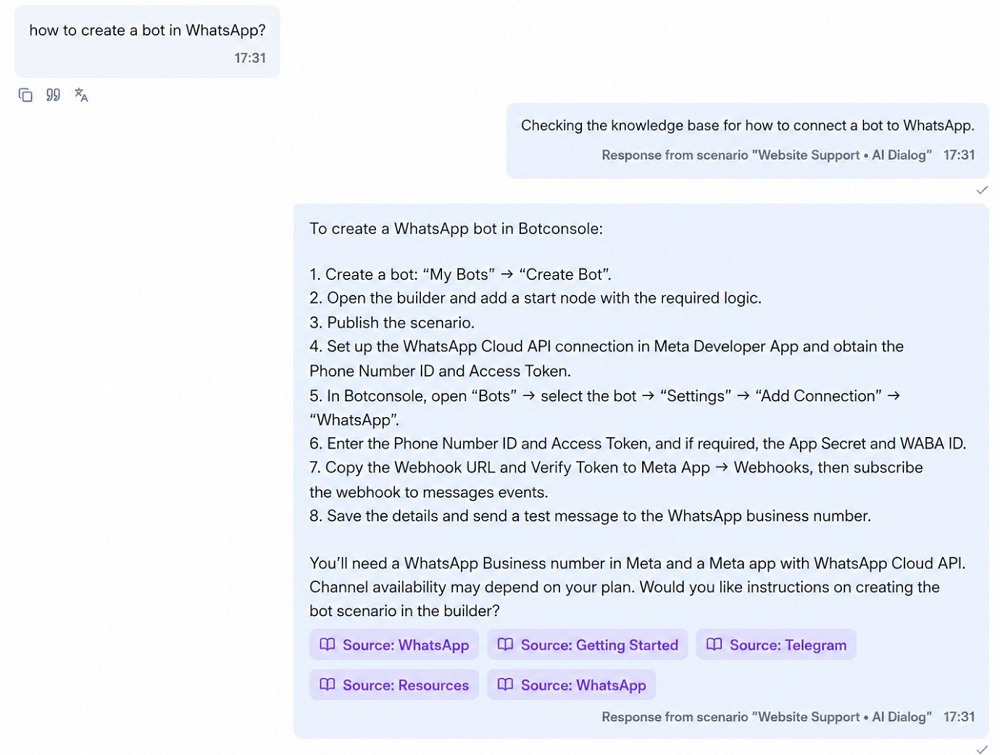
Ready to automate your Telegram workflow? Connect top AI models to your business knowledge base in Botconsole with a visual no-code builder.
1. Why an AI Telegram Assistant Outperforms Rule-Based Bots
Traditional chatbots rely on static decision trees. If a user mistypes a word, asks two questions at once, or types free-form text, the bot breaks and returns a generic "Sorry, I didn't understand that" error.
An AI chatbot for Telegram handles conversations naturally:
🧩 Use a ready-made free template: ChatGPT bot — Start with a ready-to-use AI conversation flow • 10 uses
  Customer: "How much is priority shipping to Austin, TX, and do you offer BNPL?"
                                    │
                                    ▼
       ┌─────────────────────────────────────────────────────────┐
       │ "AI Dialog" Node in Botconsole                          │
       │ 1. Analyzes buyer intent and parses multiple questions  │
       │ 2. Retrieves shipping rates and payment terms from RAG  │
       │ 3. Generates a polite, factual response in 1-2 seconds  │
       └────────────────────────────┬────────────────────────────┘
                                    │
                                    ▼
  Bot: "Priority shipping to Austin takes 2–3 business days for $8.99.
        We also support 4 interest-free installments via Klarna and
        Afterpay on orders over $50."
Comparing legacy bots to AI-powered bots:
| Feature | Button-Based Chatbot | AI Bot in Botconsole |
|---|---|---|
| Query Understanding | Exact button clicks and rigid keywords only | Natural language comprehension across all phrasing |
| Handling Edge Cases | Dead ends and lost customers | Understands typos, slang, and compound questions |
| Knowledge Management | Requires manual setup of hundreds of branch paths | Simply upload your PDF guides, product catalogs, or FAQs |
| Lead Qualification | Repetitive forms with high abandonment | Conversational data extraction during regular dialogue |
| AI Hallucinations | None (no AI capability) | Eliminated via RAG vector search and strict system prompts |
2. How AI Telegram Bots Work Under the Hood
To safely deploy AI in customer-facing business workflows, the model must be anchored to verified business data. Botconsole uses a three-part architecture:
💡 Read also: How to choose the best AI model for your business assistant: balancing quality, speed, and cost — Choose the right model for quality, speed, and cost • 8 mins read
- Telegram Bot API: Secure gateway for receiving user inputs and delivering formatted messages, buttons, and media.
- Knowledge Base (RAG — Retrieval-Augmented Generation): A vector database that indexes your documentation, pricing sheets, and policy files.
- AI Dialog Node: The processing engine that combines user history, custom system instructions, and retrieved facts to produce accurate answers.
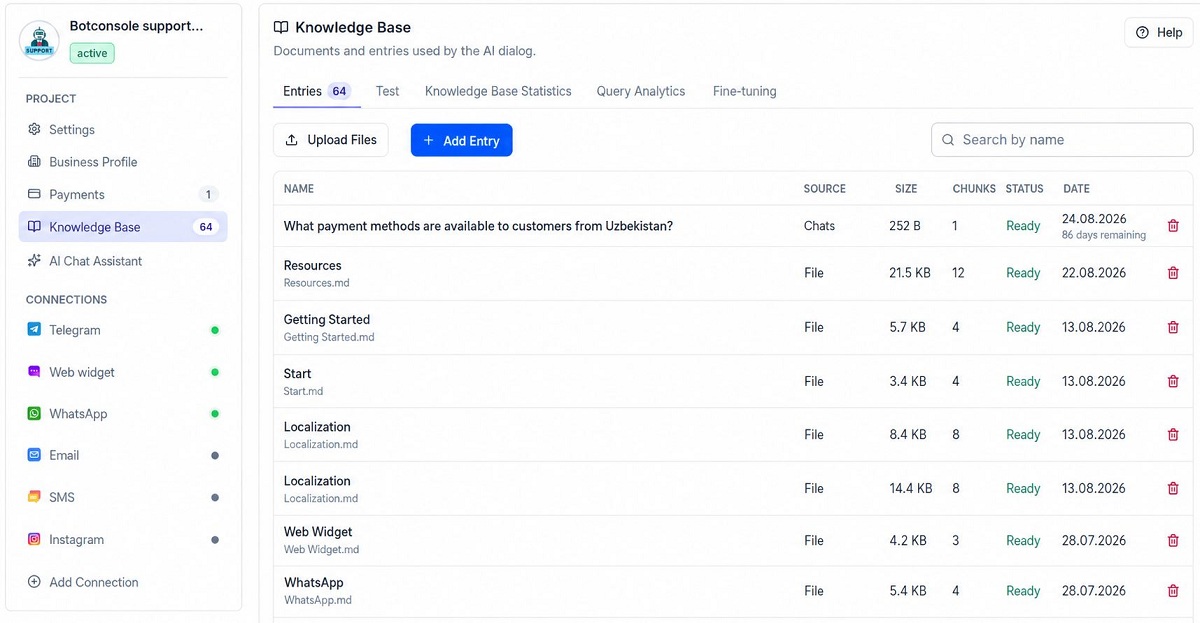
3. Step-by-Step: How to Build an AI Telegram Bot
Step 1. Register a new bot via @BotFather in Telegram
- Open Telegram and search for the official
@BotFatherbot. - Send the
/newbotcommand. - Choose a display name (for example,
Apex Sales Assistant) and a unique username ending inbot(for example,apex_sales_ai_bot). - Copy the generated HTTP API Token (formatted like
7123456789:AAH...).
Step 2. Connect your bot to Botconsole
- Sign up for Botconsole and navigate to the Bots dashboard.
- Click Add Bot, select the Telegram channel, and paste your API token.
- Open the visual scenario builder.
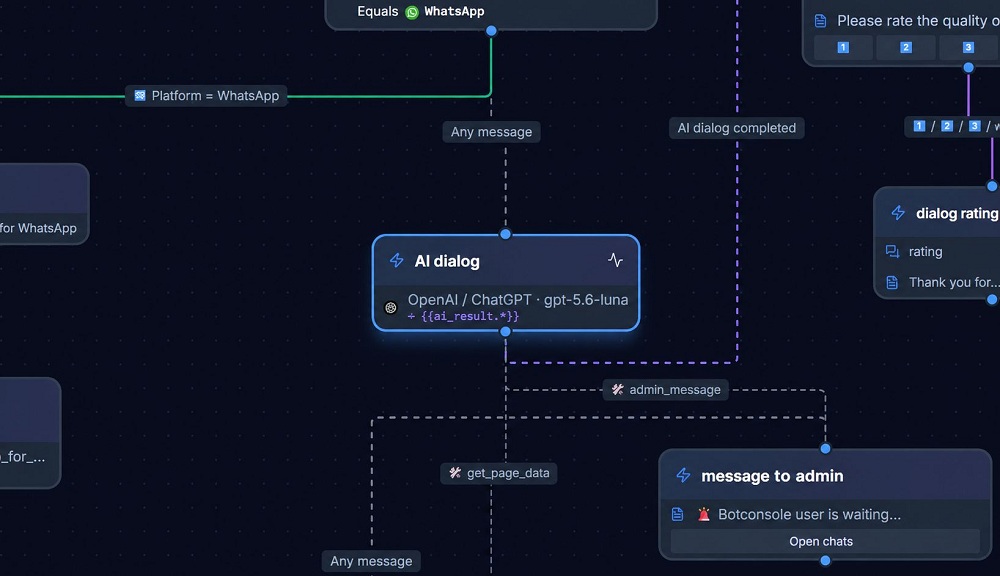
Step 3. Upload your company knowledge base
- Go to the Knowledge Base section in your bot settings.
- Upload your source files: pricing lists, product manuals, shipping policies, and warranty details.
- Botconsole automatically chunks the documents into semantic passages and generates vector embeddings.
Step 4. Configure the AI Dialog node and system prompt
In the node configuration panel, choose your model provider (such as OpenAI GPT-4o-mini, Anthropic Claude 3.5 Sonnet, or Google Gemini 2.0 Flash) and define the system role:
Role: You are an expert sales and support specialist for [Company Name].
Objective: Answer customer questions accurately using only the provided Knowledge Base.

Guidelines:
1. Keep replies concise, professional, and limited to 2-3 sentences.
2. If the answer is not in the knowledge base, state: "I don't have that information right now. Would you like me to connect you with our team?"
3. Ask only one follow-up question per message.
Tip: Use Botconsole's built-in prompt analyzer to receive AI-powered recommendations on improving clarity, guardrails, and tone before going live.
💡 Read also: AI Chatbot on Company Knowledge: Prices, Services & RAG Without Hallucinations — Learn how to ground AI answers in trusted business data • 11 mins read
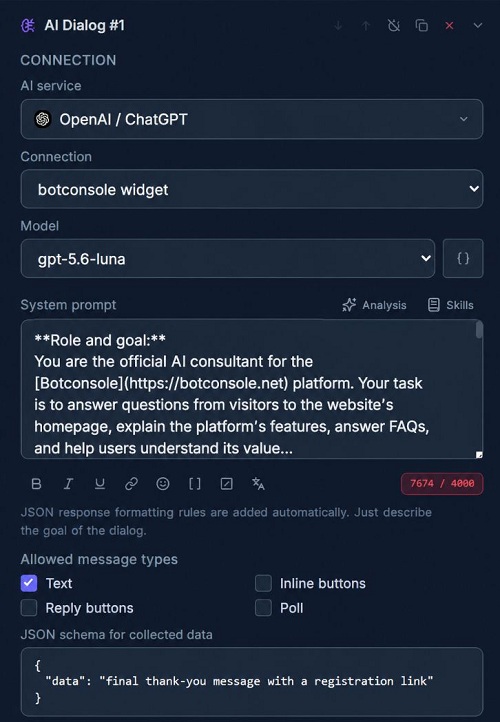
Step 5. Capture lead information into structured JSON variables
The AI Dialog node can qualify leads conversationally without forcing users through tedious forms. Define the target schema in the node settings:
{
  "full_name": "string",
  "email": "string",
  "company_size": "string",
  "budget": "string"
}
As the customer chats, the AI extracts these fields into variables like {{ai_result.email}} and triggers actions to update your CRM (HubSpot, Salesforce) or send an instant alert to your sales team.
4. Practical Business Use Cases for AI Telegram Bots
- 24/7 E-commerce Sales Representative: Recommends products based on user preferences, checks inventory, and explains return policies.
- B2B Lead Qualification: Engages inbound traffic from marketing campaigns, scores prospects based on budget and timeline, and books discovery calls.
- Tier-1 Help Desk: Instantly resolves repetitive questions regarding billing, password resets, and account setups.
- Internal Employee Onboarding: Serves as a digital HR mentor that answers questions about company policies, benefits, and tools.
Frequently Asked Questions (FAQ)
How much does it cost to operate an AI Telegram bot?
Operating costs include your Botconsole plan and model API usage. Using cost-efficient models like GPT-4o-mini or Gemini Flash, processing 1,000 multi-turn customer conversations typically costs less than $1 to $2 in API tokens.
Will the AI hallucinate or make up inaccurate information?
With an active Knowledge Base (RAG) and negative constraints in your system prompt, hallucination risk is minimized. The bot is strictly instructed to answer based only on your uploaded documentation.
Can human agents take over conversations when needed?
Yes. You can add an AI tool linked to a Chat Actions node that transfers the conversation to a human manager. In the settings, you can automatically pause AI auto-replies so your team has full control over the thread in the unified Chats inbox.
Does the bot support voice messages?
Yes. You can route incoming audio through a speech-to-text integration (such as OpenAI Whisper) before passing the transcribed text to the AI Dialog node.
Conclusion
Deploying an AI-powered Telegram bot allows businesses to deliver instant, high-quality customer experiences around the clock while reducing support overhead.
Build and launch your first AI Telegram bot with Botconsole today!


Terms of material usage
Full or partial copying of materials is allowed only with an active and indexed link to the original source: https://bitro.top/blog/en/31/how-to-build-an-ai-telegram-bot-step-by-step-guide